Create Handbells Used Chart
How to get there
- Choose the Selection tool
 .
.
- Select the
region of the document containing notes you want to include in a handbell
used chart (or Press COMMAND-A to select all).
- Choose Utilities > Create Handbells Used
Chart.
What it does
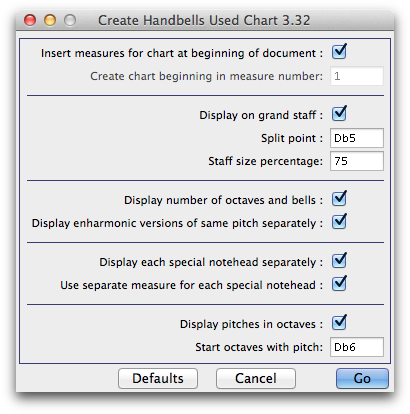
This utility creates a ‘handbells used’
chart automatically based on all pitches discovered in a region selected
with the Selection Tool. The chart can be a single treble clef staff or
grand staff. The chart can be added to the beginning
of the document, as is standard practice for handbell scores.
- Insert
measures for chart at beginning of document. Check this option
to instruct PrintMusic to create a new measure at the beginning of the document
to be used as the Hand Used chart.
- Create
chart beginning in measure number __. Enter the measure you wish
to insert the hand used chart. If the measure specified is not empty you
will be prompted to choose to overwrite the measure. This text box is
only available if the above option ‘Insert measures for chart at beginning
of document’ is unchecked.
- Display
on Grand Staff. Check this option to display the chart on both
staves of a grand staff. If this option is not checked the chart will
always appear on a single staff in treble clef. When the chart is displayed
on a grand staff the default split point is Db5 (notes of Db5 or above
appear on the treble clef staff).
- Set
split point. To specify an alternative split point, enter it here
(C5 = Middle C). This is the lowest note that will display in the treble
clef staff.
- Staff
Size Percentage. Here, enter the size (as a percentage of the regular
staves) you would like to display staves in the handbells used chart.
- Display
number of octaves and bells. Check this option to automatically
add a text expression above the chart that displays the
number of octaves and bells used.
- Display
enharmonic versions of same pitch separately. Check this option
to display both spellings of the same pitch in the chart. For example,
if an F sharp and G flat are both notated in the document and in the selected
region, both of these spellings will appear in the chart.
- Display
each special notehead separately. Check this option to display
special noteheads, such as diamond handchime noteheads, in a separate
sequence. If this option is not checked, special noteheads are represented
as regular noteheads in the bells used chart.
- Use
separate measure for each special notehead. Check this option to
place the sequence of special noteheads in its own measure. The special
notehead sequence will appear in a separate measure after the regular
bells used chart with the exception of diamond noteheads (open/closed)
which will appear in the same chart regardless of this setting.
- Display
pitches in octaves. Check this option to group multiple notes vertically
if they are an octave apart. Pitches are only displayed in octaves on
the treble clef staff.
- Start
octaves with pitch. Here you can specify the lowest pitch you wish
to display bells used in octaves.
- Go
• Cancel • Defaults. Click Go to generate the bells used
chart based on your settings. Click Cancel to dismiss the dialog box
without making any changes. Click Defaults to restore this dialog box
to the default settings.
